Simulate
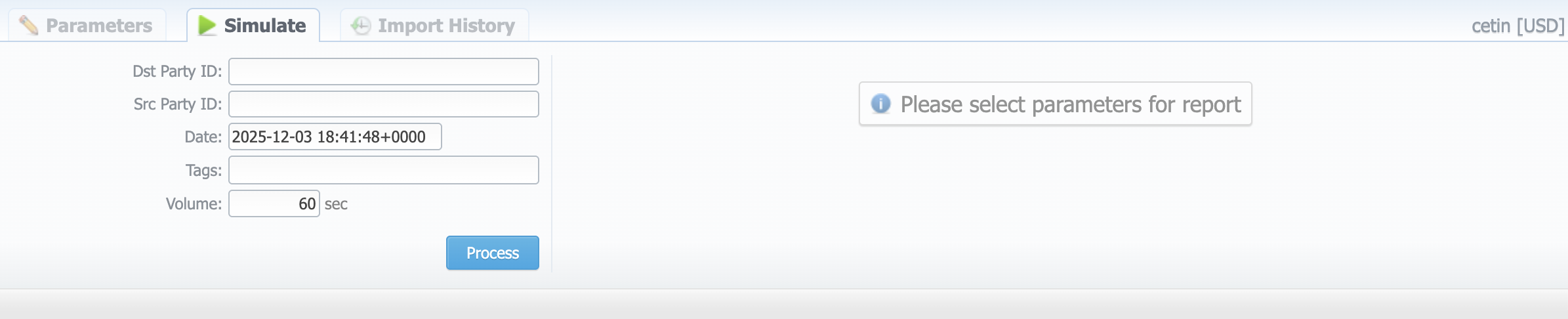
Simulate tab gives you the possibility to see the exact rate, which will be used for a specified destination number, and also resulting cost if such an event takes place. To simulate an event, fill in the following fields and click Process:
| Field | Description |
|---|---|
| Dst Party ID | Specify Dst number of the event |
| Src Party ID | Specify Src number of the event |
| Date | Indicate the event date |
| Tags | Indicate the necessary tags |
| Volume, (sec) | Specify event volume (seconds, bytes, events, etc.) |
warning
Note that only rates with "active" status can be used to simulate rates. Rates with Stashed status will not be displayed.
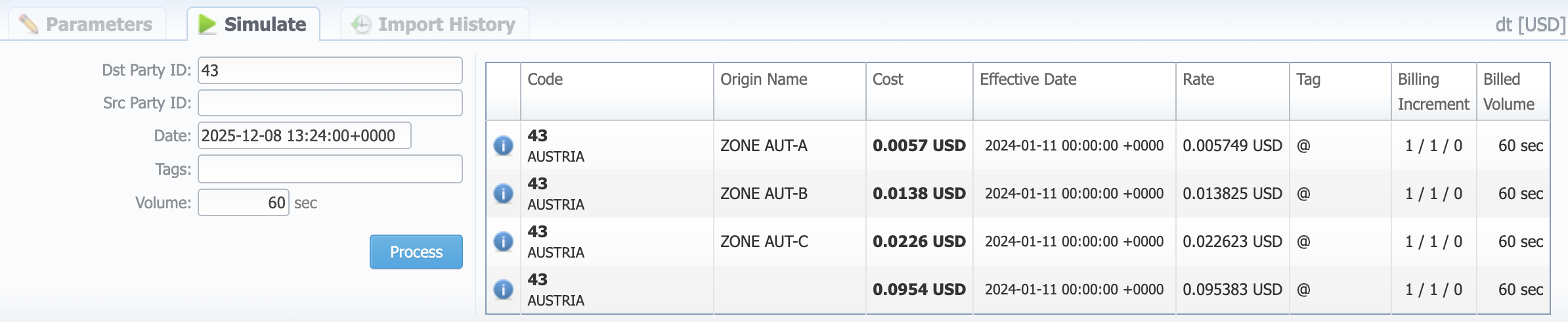
The results of a simulated event are presented in a table with the following structure:
| Column | Description |
|---|---|
| Info icon | Hover over this icon to view additional parameters (setup fee, time profile) |
| Code | Destination code |
| Origin Name | Name of the event origin |
| Cost | Cost of an event |
| Effective Date | Rate start date |
| Rate | Event price for a specified unit. Units ratings are configured in the Services section. For instance, for call service, an indicated rate may be a price for 1 second, 1 minute, 1 hour, or 1 day. |
| Tag | Rate tag |
| Billing Increment | Information of minimal call time that will be tariffed, tariffication interval, and time interval, below which the event is not tariffed (grace volume), separated by "/". |
| Billed Volume | Billed time (minimal time of billing increment) |
note
If the queried destination is blocked:
- the Cost will not be displayed;
- the Rate will be displayed as blocked;
- the Billed Volume will not be displayed.