Agreements
The Agreements section provides a list of agreements between clients and vendors on the rates changes and notifications. The system considers agreements while generating rates and during clients' notifications.

| Column Name | Description |
|---|---|
| ID | Agreement's identification number |
| Name | Name of an agreement |
| Notification Day | Day, on which a vendor agreed to send notifications to the customer |
| Increased Rate | Delay that indicates the minimal period between notification date and date of an increased rate |
| Decreased Rate | Delay that indicates the minimal period between notification date and date of a decreased rate |
| Unchanged Rate | Delay that indicates the minimal period between notification date and date of an unchanged rate |
| New Rate | Delay that indicates the minimal period between notification date and date of a new rate |
| Closed Rate | Delay that indicates the minimal period between notification date and date of a closed rate |
| Blocked Rate | Delay that indicates the minimal period between notification date and date of a blocked destination |
| Reseller | A reseller of an agreement |
| Sort Order | Order of the entity in the list |
Functional buttons and icons, presented in the section, are as follows:
| Button/Icon | Description |
|---|---|
 | Allows adding a new agreement to the system |
 | Allows deleting an agreement from the system |
Creating a New Agreement
To create a new agreement, you need to click the New Agreement button, and the following fields will appear:
| Field | Description |
|---|---|
| Name | Title of an agreement (must be text with no more than 128 symbols) |
| Reseller | Reseller of an agreement |
| Notification Day | Define the date of the notification to the customer |
Agreement terms for new / increased / decreased / closed / blocked / unchanged rates
Define a minimal period between the notification date and the date of a rate (must be an integer between 0 and 365). There are various options to schedule this date:
| Option | Description |
|---|---|
| days from last midnight | The rate will be changed after the specified amount of days from the midnight of the defined Notification Day |
| days from notification | The rate will be changed after the specified amount of days from the defined Notification Day |
| hours from XX:00 | The rate will be changed after the specified amount of hours from the start of an hour of the current agreement creation |
| hours from notification | The rate will be changed after the specified amount of hours from the defined Notification Day |
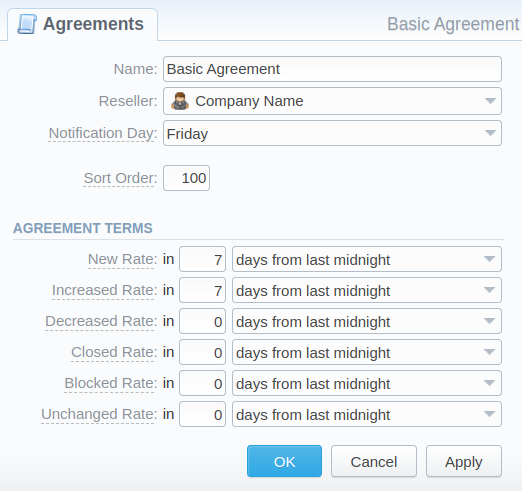
After filling in all the required fields, click OK, and the new agreement will appear in the list.