Origin Decks
Section overview
Origin Decks are lists of Origins with corresponding sets of Codes. An Origin Deck is a key element in origin-based rating process. It can be assigned to the Rate Table and populated in bulk during the Rates import process.
The section is presented in the form of a list of all existing Origin Decks in the system:

| Column | Description |
|---|---|
| ID | Origin Deck's identification number |
| Name | Name of an Origin Deck |
| Quantity | Number of Origins within an Origin Deck |
| Reseller | The owner of an Origin Deck |
Functional buttons/icons, presented in the section, are as follows:
| Button/Icon | Description |
|---|---|
 | Allows to create a new Origin Deck. |
 | Allows to manage an existing Origin Deck. |
 | Allows deleting an Origin Deck from the system. Requires confirmation. |
Creating a new Origin Deck
To create a new Origin Deck:
- Click the New Origin Deck button.
- Fill in all required fields of a pop-up window.
- Click "OK".
Subsequently, a new Origin Deck will be added to the list.
Adding origins
In the List of Origins tab, click the New Origin button to add a code group to your deck. The pop-up window contains the following parameters:
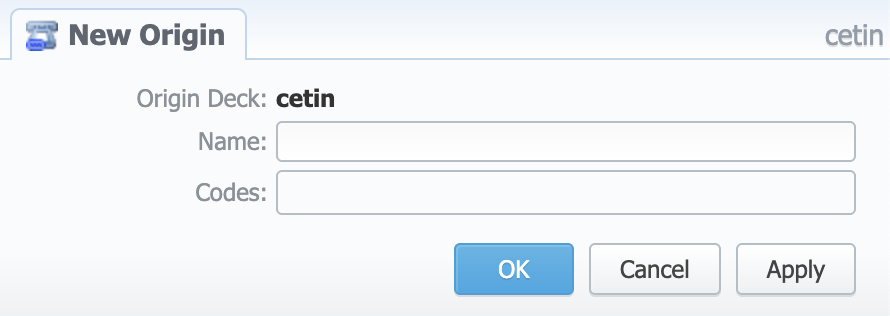
| Field | Description |
|---|---|
| Origin Deck | Name of the deck. Auto-filled by the system |
| Name | Display name of an Origin |
| Codes | A list of Codes for the respective Origin |
You can import Origins in bulk during the Rates import process.
Deleting origins
You can either delete each Origin separately by clicking the icon opposite corresponding Origin or delete all Origins at once by clicking the Mass Delete button.
To verify mass deletion, click "OK" in a pop-up window.
Origins are cached. After creating, updating, deleting, or importing origins, the Cache Manager should be restarted to apply the changes, so that origins will be used during the identification or routing.
Unlike the source codes, all matching origins will be used during call identification regardless of the match length. For example, assuming you have origins “44” and “442” defined, the number “442031299126” will match both of them.