Release 3.28
JeraSoft presents a major release of JeraSoft Billing 3.28 introducing new features and functional improvements. Please find a complete revision list below.
Major updates
Origin based rates
Following growing market demand, we have implemented a significant improvement to how our system processes Origin-based rates (OBR). Starting from the v3.28 of JeraSoft Billing, you will be able to process rate files that contain "Origins" and import OBR a lot easier than before. Moreover, with the current approach, the system will save space in your Rate Tables when importing such Rates.
Origins & Origin Decks
In the scope of this improvement, we have introduced a new entity to the system – Origin Decks. It is located in the Configuration drop-down menu.

An Origin Deck is a set of Origins that include one or several prefixes. Different prefixes (codes) can be present in several Origins at the same time. Origins are an essential entity in the new OBR approach. Currently, you can populate your Origin Decks manually or via Rates Import.
You can find more detailed information on Origin Decks management [here] (link cannot be added yet).
Origins are cached. After creating, updating, deleting, or importing origins, the Cache Manager should be restarted to apply the changes, so that origins will be used during the identification or routing.
OBR Rates in the system
All of the daily rate management tasks support Rates with defined Origins:
- You can assign an Origin Deck to the Rate Table.
- You can manually add Rates with defined Origin.
- You can filter Rates list by Origin Names.
- You can export filtered Rates with the ability to add separate sheets with OBR and Origins.
- You can notify customers about OBR changes – the Rates Notification tab in Reseller settings supports adding separate sheets with OBR and Origins to a rate file.
- You can import rate files with Origins both within a rates sheet and from a separate sheet. Import process is the same as for Codes: by using "Update Deck" option in the Advanced Import settings for Origin Decks.
- You can use Rates Simulation tool for OBR: if Src Party ID is set, Rates are matched by Origin. If none are found, regular rates (without specified origin) are shown.
- You can query Summary Report, Orig-Term Report, and xDRs Report filtering and/or grouping by Origin Name.
Currently, the OBR will not be processed in Rates Generator and Rates Analysis.
Call flow adjustments
The rate identification and routing decision stages of call processing have been adjusted taking into account OBR. Here are some important things to note:
- OBR Rates have a higher priority than regular Rates.
- If there are OBR Rates for a specific destination, regular Rates will never apply.
- Unlike the source codes, all matching origins will be used during call identification regardless of the match length. For example, assuming you have origins “44” and “442” defined, the number “442031299126” will match both of them.
Rerating
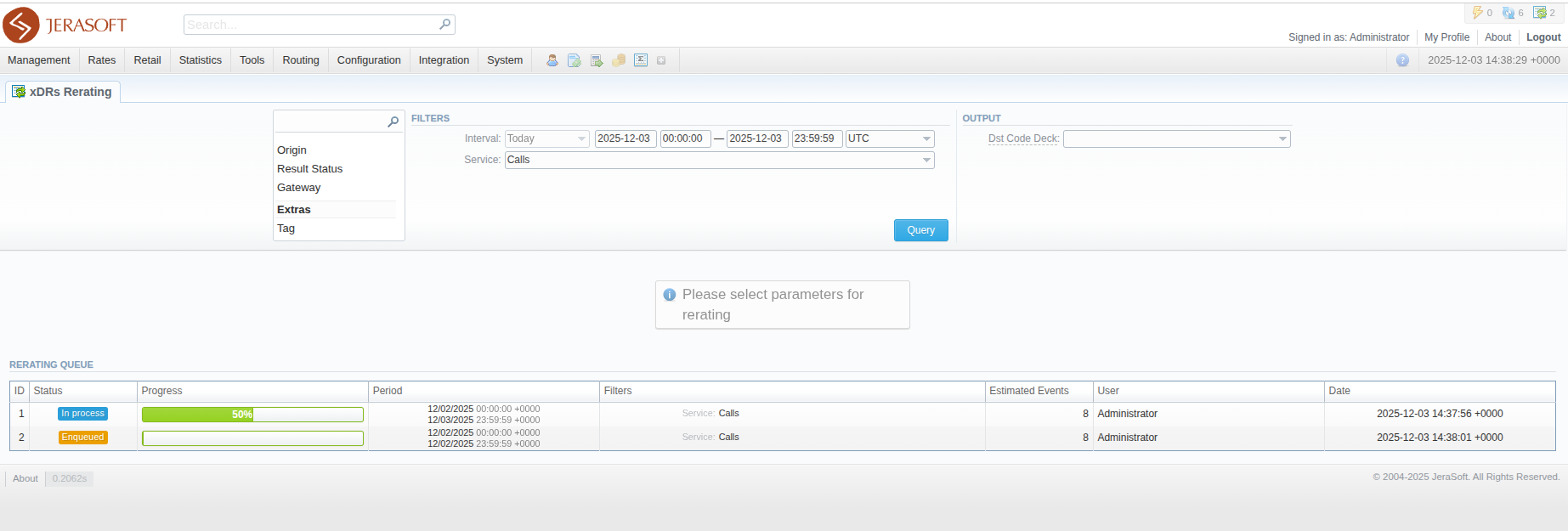
By popular demand, we have added a new Reraring Queue section to the Rerating interface with detailed process status. This new section provides insights on the progress of the scheduled rerating requests, as well as some other additional info.
Active Sessions
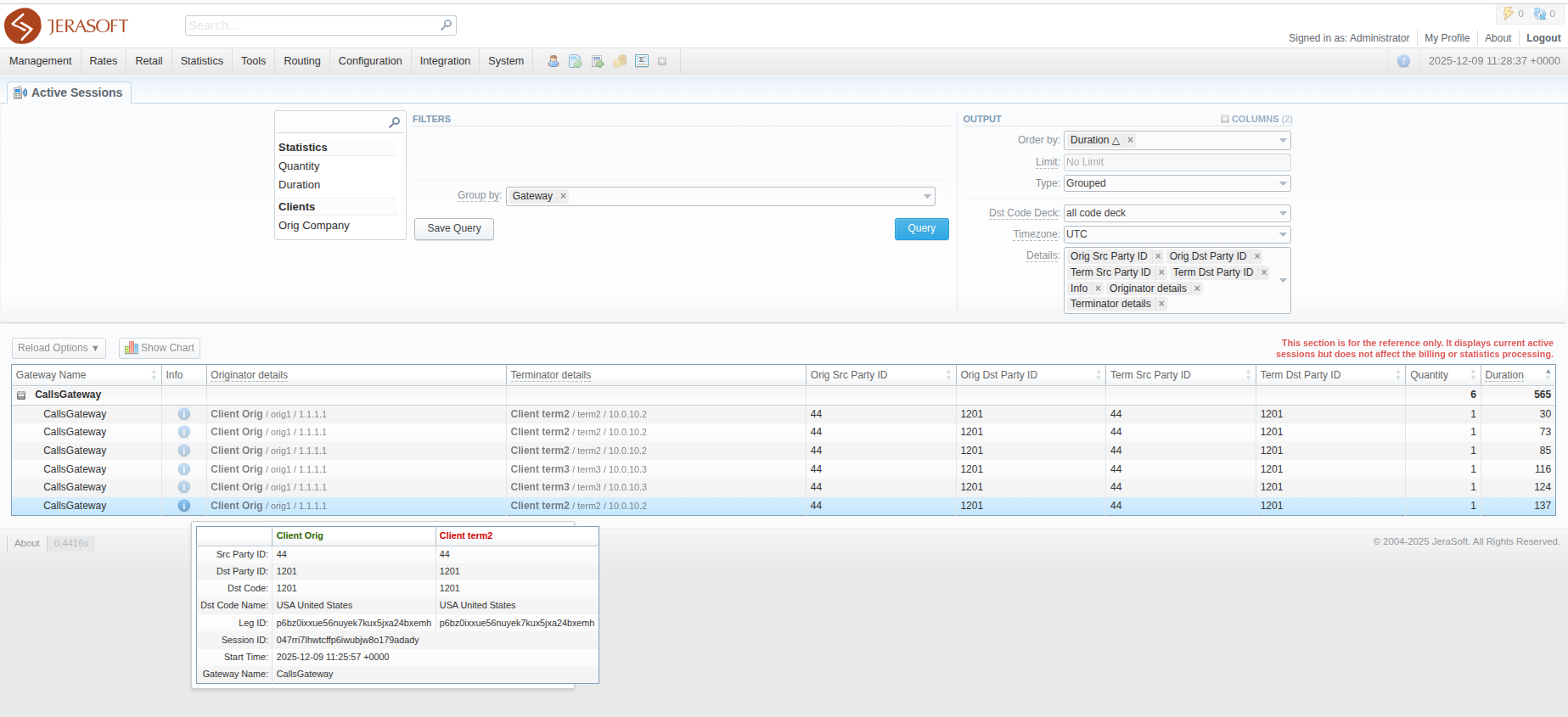
After aligning the Active Sessions report with the unified system framework, it became visually different from the previous versions' interface, which has introduced delays in monitoring for some cases. To overcome this, we have provided our users with more control over how the report is built.
A new field was added to the Output section of the query settings block: "Details". With this new functionality, you can have additional columns in your report ("Info", "Originator details", "Terminator details", "Orig Src Party ID", "Orig Dst Party ID", "Term Src Party ID", "Term Dst Party ID"). They will be used for grouping (just like "Group By" columns), but behave like regular output columns.
Minor updates
Number Portability
The "JeraSoft LNP Common" collector has been reworked to support the Routing Number (RN).
Traffic Processing
In line with making LNP processing more versatile, we have added the LNP Actions block to Traffic Processing Rules.
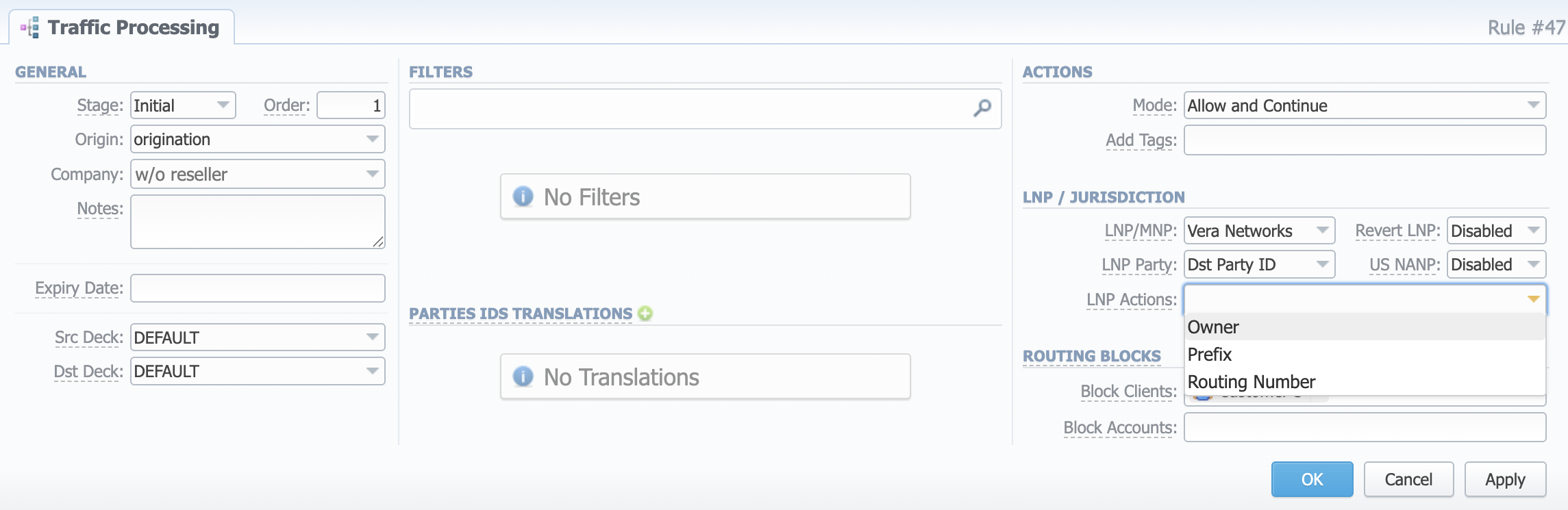
With the help of this functionality, you can define, which actions should be applied to an event after LNP dipping. The system can:
- Add an Owner as a tag to the event;
- Prepend a Prefix to the selected LNP Party ID;
- Replace LNP Party ID with a Routing Number.
Rates
To enhance daily Rates management, we have restricted ordering possibilities. From now on, you can order the Rates list only after the Rate Table is selected.
Events Log
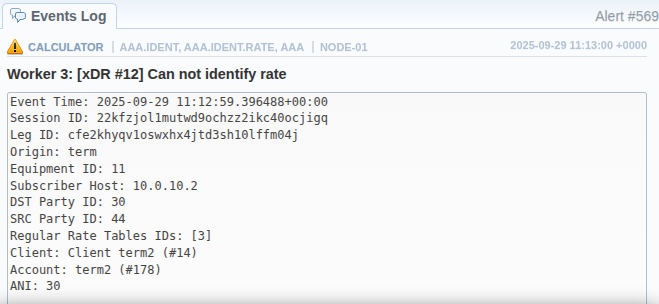
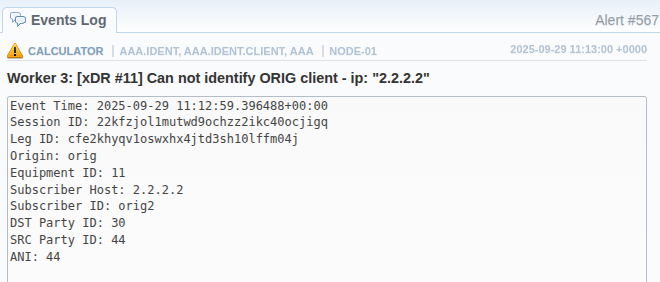
The identification error messages from Calculator service have been reworked to display more useful data for further analysis. You can access full list of parameters by clicking the  button.
Statistics Manager
We have improved the statistics packages processing while restoring old statistics in the system.
DID Management
Following the addition of Custom Fields for DIDs, we have improved the speed of exporting DIDs when using custom fields.
Deprecations
Additive Rates
The Additive rate policy is marked as DEPRECATED and will be fully removed in the next release.